Enigma OS Documentation
Fully-configurable in-world control surface for VRChat
Project maintained by Cozen-Official Hosted on GitHub Pages — Theme by mattgraham
Whitelist (Access Control)
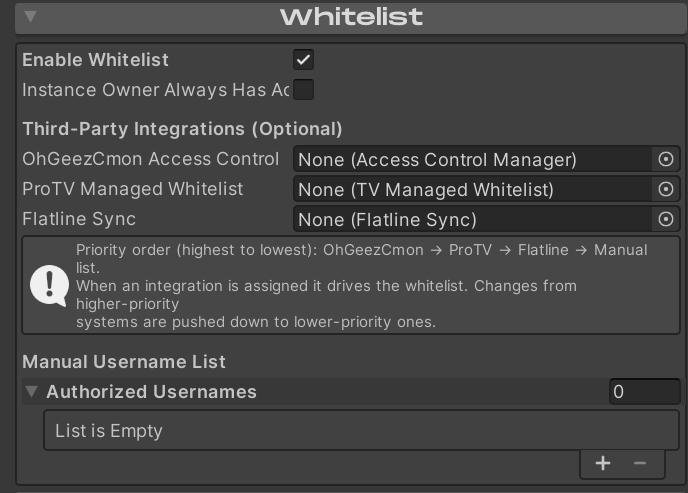
Enigma OS supports whitelisting users through a manual username list or various third party integrations. Supply usernames in the Manual Username List (case insensitive). If desired, add a reference to a third party integration. If one is supplied, Enigma OS will use that whitelist instead, using the manual list ONLY in the case that it fails to pull the whitelist from the third party whitelist, which would be unusual.
Enigma OS supports OhGeezCmon Access Control, ProTV Managed Whitelists, and Flatline Sync. The download links for these are in Installation and Dependencies. You can assign more than one; see Using more than one whitelist together below for how Enigma OS keeps them in sync.
The whitelist also gates the syncing of the hand collider objects for fader control.
Using more than one whitelist together
When you assign more than one integration, Enigma OS keeps them in sync by mirroring changes downward from the highest-priority system you have assigned. In priority order, highest first, that is:
- OhGeezCmon Access Control
- ProTV Managed Whitelist
- Flatline Sync
- Manual Username List
The highest assigned system is the source of truth, so make your whitelist edits there. Enigma OS copies those changes down into the other systems automatically. The lower systems act as read-only mirrors: a change made directly in a lower system (for example, authorizing someone in Flatline while OhGeezCmon is also assigned) does not travel back up, and may be overwritten the next time the source of truth syncs.
Pre-authorized users propagate too. Names you seed ahead of time (such as OhGeezCmon’s “Players With Starting Access”) are pushed into the other systems, so those players are already authorized the moment they join — even if they were not in the world when you added them.
Enigma OS checks for changes every couple of seconds, so an update can take a moment to appear in the other systems. That short delay is normal.
Setup requirements
- ProTV Managed Whitelist — the Managed Whitelist must have its TV reference wired to your ProTV TV. Enigma OS will not push into a Managed Whitelist that is not connected to a TV.
- Flatline Sync — turn on Flatline’s Use External Whitelist option. Enigma OS drives Flatline’s admin menu directly, and this prevents Flatline’s own startup whitelist logic from conflicting with it.
- ProTV panels and inactive/whitelist-gated containers — do not nest ProTV UI panels (such as MediaControls) under any GameObject that is inactive on world start or whose visibility is gated by an OhGeezCmon whitelist. A ProTV panel that is inactive while the TV starts up can come back with a blank track title and time display. Keep media-control panels somewhere that is active at world load, and use the whitelist to gate interaction rather than visibility. Enigma OS also protects against this: it never hides the admin menu before it has granted it once in a session, and when it re-shows the menu it asks ProTV to refresh its panels.
ProTV super users and what happens when the host leaves
ProTV only lets a ProTV super user edit its whitelist. ProTV treats the following as super users:
- The instance owner (the person who created the instance), while they are present.
- Anyone listed in the Managed Whitelist’s Super Users field.
- The first instance master, if you have enabled ProTV’s first-master-is-super options.
Importantly, the instance master is not automatically a super user. If the instance owner (or whoever was acting as your super user) leaves, the master role passes to another player, but that new master cannot edit the ProTV whitelist. When this happens, Enigma OS can still update OhGeezCmon, Flatline, and its own access — only the ProTV list stops receiving new changes until a super user is present again. Anyone already on the ProTV list stays authorized.
To keep the ProTV whitelist syncing even after you leave, add your trusted co-hosts to the Managed Whitelist’s Super Users field before uploading. As long as at least one super user is in the instance, changes keep flowing into ProTV.
Note: OhGeezCmon Access Control automatically grants admin access to whoever is the current instance master. This means the master always has full control of the whitelist (and therefore of Enigma OS). If that is not what you want, consider whether OhGeezCmon should be your top-priority system.
| ← Advanced Features | Standalone Buttons → |